


Running a promotion sounds simple enough. Create a coupon, publish it, and watch the orders come in.
In reality, a discount code is only one part of the equation. The way it’s configured, who can use it, when it expires, and where it fits into your wider ecommerce strategy all affect whether it increases sales or simply cuts into your margins.
Fortunately, Wix makes promotions easy to manage. You can create percentage discounts or Buy X Get Y deals without needing custom code. Once you understand how it works, you can build offers that encourage purchases while keeping your pricing strategy under control.
If you want to know how to set up a discount code on Wix, here’s where to begin.
Understanding the Different Types of Wix Discounts

Before creating your first coupon, think about what you want the promotion to achieve.
Not every sale needs to apply across your entire store. In many cases, a targeted offer delivers better results than a blanket discount.
Wix allows you to create several promotion types, including:
- Percentage discounts
- Fixed amount discounts
- Free shipping coupons
- Buy X Get Y offers
- Automatic discounts at checkout
Each has a different purpose.
A percentage discount works well during seasonal sales. Free shipping can reduce cart abandonment. Buy X Get Y promotions encourage customers to spend more, while automatic discounts remove the need for shoppers to enter a code at all.
Choosing the right promotion usually has a bigger impact than simply increasing the discount amount.
Customise Your Discount Details
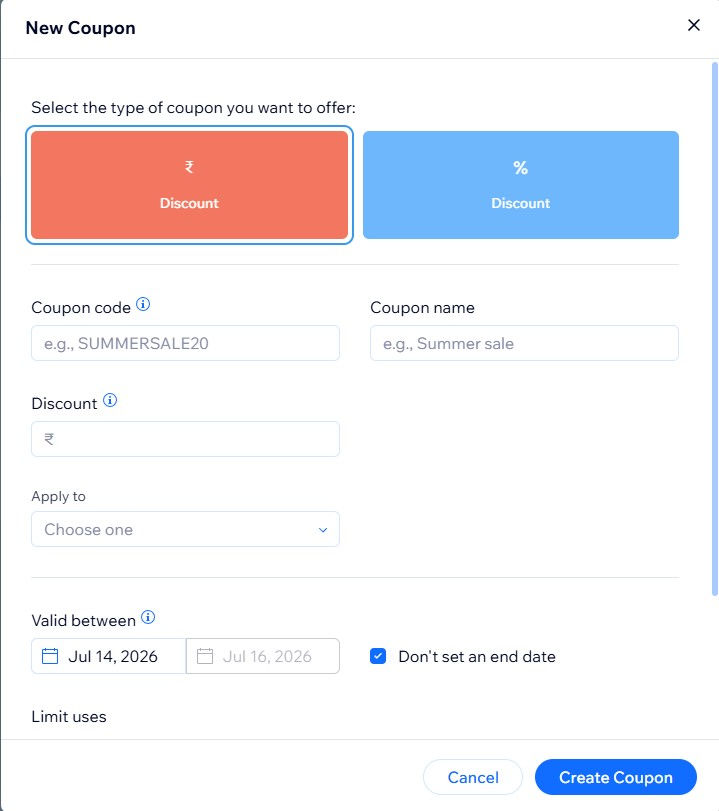
Everything starts inside your Wix dashboard.
Open your store’s coupon settings, choose the promotion type you want to run, then create your code. From there, you can customise details, including:
- Coupon name
- Discount value
- Start and expiry dates
- Minimum spend requirements
- Eligible products or collections
- Customer usage limits
These settings give you far more flexibility than applying a storewide discount.
Think Beyond the Discount Percentage
Many businesses focus on the size of the discount.
In practice, the structure behind the promotion often matters more.
A minimum spend can increase average order value. Limiting a coupon to selected collections protects your best-selling products. Expiry dates create urgency without leaving outdated promotions running for weeks.
Small settings like these have a noticeable impact on profitability. That’s why we encourage clients to treat promotions as part of their wider ecommerce strategy rather than standalone marketing campaigns. Our Wix ecommerce solutions help businesses build stores that support promotions while keeping the buying experience straightforward.
Promote Without Confusing Customers
Knowing how to add a discount code on Wix is one thing. Making sure customers can actually use it is another.
If shoppers can’t work out why a coupon isn’t applied, struggle to find the code, or only discover restrictions during checkout, the promotion quickly becomes frustrating.
Before launching any campaign, test it yourself.
- Add different products to the cart.
- Check minimum spend rules.
- Test the coupon on desktop and mobile.
- Confirm expiry dates and usage limits work correctly.
A few minutes of testing can prevent unnecessary customer support requests later.
Measure What Happens After the Promotion Starts
Every discount campaign tells you something.
Look beyond total sales and pay attention to redemption rates, average order value, product performance and repeat purchases. These insights help you understand whether the promotion actually changed customer behaviour or simply reduced the price existing customers would have paid anyway.
Instead of repeating the same offer every few months, use that data to refine future campaigns. Our Wix app integration & management services help businesses connect reporting tools, automate repetitive tasks, and gain better visibility across their online store.
When Standard Coupons Are No Longer Enough
As your business grows, your promotions often become more sophisticated.
You may want to reward loyal customers differently from first-time shoppers, automate abandoned cart offers, or personalise discounts based on customer behaviour. Those features often require more than the default coupon settings.
Personalisation also helps avoid unnecessary discounting. A new visitor might receive a welcome offer, while a returning customer could be shown free shipping or early access to a new collection instead. Rather than relying on blanket promotions, think about how your content and offers work together throughout the customer journey.
Our web development services help businesses build ecommerce stores that support more advanced functionality. You can also check out our guide to adaptive content on Wix, which explores ways to personalise the shopping experience.
Common Mistakes to Avoid
Most discount codes don’t fail because of the discount itself. They fail because the setup creates unnecessary friction.
Before publishing your next promotion, double-check that:
- Expiry dates are correct.
- The discount only applies to intended products.
- Coupon rules don’t conflict with other promotions.
- The code has been tested on mobile devices.
- The offer supports a clear business goal.
Taking a few extra minutes to review these settings is much easier than fixing problems after customers begin using the code.
Building a Smarter Promotion Strategy
A discount code should support your business, not train customers to wait for sales.
The strongest ecommerce stores use promotions with a clear purpose. That might mean increasing average order value, introducing a new product, rewarding loyal customers or recovering abandoned carts. Every campaign should fit into a broader strategy rather than existing on its own.
At Volt Agency, we help businesses build Wix ecommerce stores that are easy to manage, simple for customers to shop, and designed to grow over time. Whether you’re launching a new store or improving an existing one, our team can help you build a better long-term ecommerce strategy.
Learn more about us or contact our team to discuss your Wix project.


